This sample (59.8 KB) shows how an embedded chart’s data in the docx template can be updated using ETL.
Preparation:
Unzip and copy the following files to your Ambience/Repertoire 202x installation path:
- ./data/in/chart/in.xslt
- ./data/in/chart/DirectDataEdit.docx
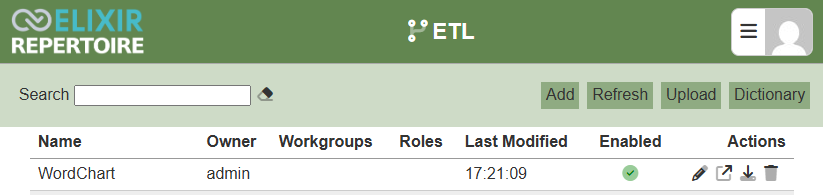
Upload WordChart.chainset.json to the ETL module.
Sample Details:
The sample docx used is from Libre Office, the output from Word may look different but the way chart values are embedded remain the same.
Unzip DirectDataEdit.docx to view the embedded chart data:
-
DocX allows creating charts using embedded data.
\DirectDataEdit\word\embeddings\Microsoft_Excel_Worksheet.xlsx
-
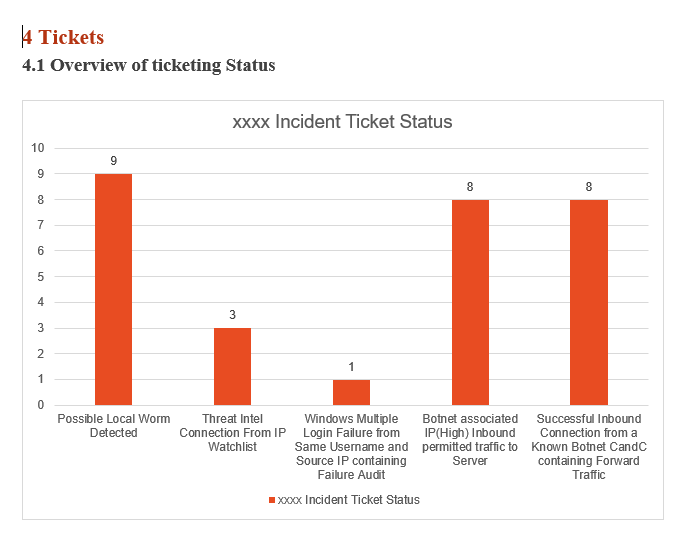
Updating the embedded chart data does not alter the output because Word keeps a cached copy and only updates when explicitly edited. The cached copy can be found in the chart XML, e.g.:
\DirectDataEdit\word\charts\chart1.xml
Contents of chart1.xml are as follows, matching what is shown on the chart (and also what is in the embedded XLSX):
  <c:numRef>
  <c:f>Sheet1!$B$2:$B$6</c:f>
  <c:numCache>
  <c:formatCode>General</c:formatCode>
  <c:ptCount val="5"/>
  <c:pt idx="0"><c:v>9</c:v></c:pt>
  <c:pt idx="1"><c:v>3</c:v></c:pt>
  <c:pt idx="2"><c:v>1</c:v></c:pt>
  <c:pt idx="3"><c:v>8</c:v></c:pt>
  <c:pt idx="4"><c:v>8</c:v></c:pt>
  </c:numCache>
  </c:numRef>
The attached in.xslt stylesheet will be used to update the chart values in chart1.xml by loading ./data/out/chart/in.xml and using its contents to substitute the existing c:numCache contents.
<xsl:stylesheet version="1.0" xmlns:xsl="http://www.w3.org/1999/XSL/Transform"
 xmlns:c="http://schemas.openxmlformats.org/drawingml/2006/chart">
<xsl:param name="fileName" select="'./data/out/chart/in.xml'" />
<xsl:param name="updates" select="document($fileName)" />

<xsl:template match="@* | node()">
  <xsl:copy>
    <xsl:apply-templates select="@* | node()"/>
  </xsl:copy>
</xsl:template>

<xsl:template match="c:numCache">
  <c:numCache>
  <xsl:apply-templates select="$updates/c:numCache/node()" />
  </c:numCache>
</xsl:template>

</xsl:stylesheet>
ETL Chainset Details:
The WordChart.chainset.json sample has the following steps:
- CreateXML: Generates five random values for the chart and writes them out to ./data/out/chart/in.xml, these random numbers are then substituted into a pattern:
“line” : “<c:pt idx="${copy}"><c:v>${value}</c:v></c:pt>\n”
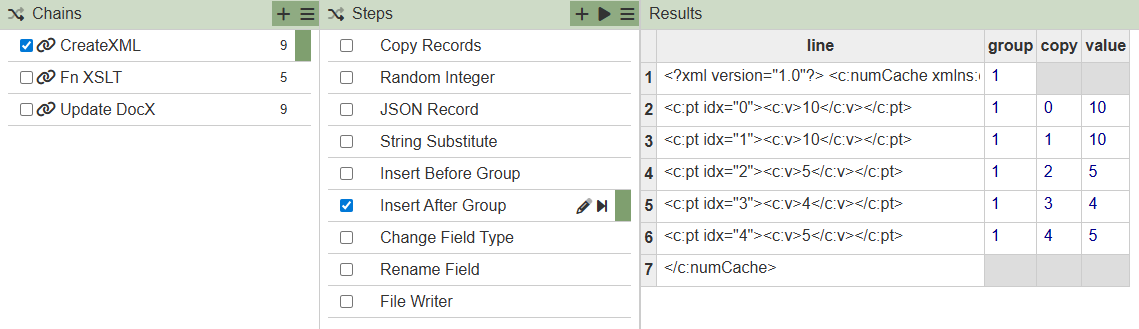
A header (Insert Before Group) and footer (Insert After Group) are then inserted, all lines changed to bytes and concatenated to a file e.g.:
<?xml version="1.0"?>
<c:numCache xmlns:c="http://schemas.openxmlformats.org/drawingml/2006/chart">
<c:formatCode>General</c:formatCode>
<c:ptCount val="5"/>
<c:pt idx="0"><c:v>9</c:v></c:pt>
<c:pt idx="1"><c:v>6</c:v></c:pt>
<c:pt idx="2"><c:v>10</c:v></c:pt>
<c:pt idx="3"><c:v>6</c:v></c:pt>
<c:pt idx="4"><c:v>9</c:v></c:pt>
</c:numCache>
-
Fn XSLT: A reusable Function which given an XML file (chart1.xml) and an XSLT file (in.xslt) can produce an output chart1.xml with the chunk replaced.
-
Update DocX: This ETL chain deletes any old temp storage, unzips the docx into temp, calls the XSLT on the chart1.xml file inside temp and then zips the result back up into a result.docx with the new chart values inside.
Note:
- Execute the sample by running CreateXML followed by Update DocX.
- The Copy Records, Random Integer and Insert Before Group steps in CreateXML can be modified/replaced for other ETL steps to ingest incoming data.
- This sample is based on updating a chart with a fixed set of series and columns.
- This sample only demonstrates updating the chart1.xml file which is sufficient if rendering DocX to PDF or viewing in Word (Word displays the cache). However, if a user opens the chart’s Edit Data in Word, the untouched embedded XLSX will show the old values and editing there reverts the chart. Updating the embedded Microsoft_Excel_Worksheet.xlsx as well is left as an exercise.