Note: This ETL feature is available from Ambience/Repertoire 2027x onwards.
This ETL sample (5.5 KB) illustrates how to create a chainset that renders an rml template to XLSX and then inserts live Excel SUM formulas into the report’s totals row. The totals row is located dynamically, so the formulas follow the data no matter how many rows the datasource returns.
Sample files attached to this post:
- XSLXrender_totals.chainset.json : the ETL chainset (
00_RenderXLSXchain). - FruitSales.rml : the report template; its section‑footer emits a
Total :label and per‑column sums. - FruitSales100.ds : a 100‑record tabular datasource used to show the formula range following the data.
When an rml template is rendered to XLSX, the totals produced by the section‑footer are written as static numbers. This sample replaces them with formulas such as =SUM(C3:C13) so the workbook recalculates in Excel. Because the row count is driven by the datasource, the chain does not hard‑code any cell position but scans for the totals row at run time.
1. Prerequisites
- Ensure the sample report template (
FruitSales.rml) and datasource (FruitSales100.ds) are uploaded to the repository before running this example. - The chainset expects the template at
/ElixirSamples/Report/RML/FruitSales.rml. - Deploy the datasource to /ElixirSamples/DataSource/FruitSales100.ds
- The report renders its title on Excel row 1 and the column headers on row 2, so the data starts on row 3 which is the
firstDataRowvalue used later.
2. Import the sample chainset
In the ETL module, import the attached XSLXrender_totals.chainset.json. Open the 00_RenderXLSX chain in the ETL Designer to review the steps below.
3. Define the JSON Record
The first step supplies the report path, the output mime‑type, and the small amount of configuration the totals logic needs. The ${...} placeholders in fC–fF are resolved later, once the totals row is known, e.g.
{
  "rml": "/ElixirSamples/Report/RML/FruitSales.rml",
  "mimeType": "application/vnd.openxmlformats-officedocument.spreadsheetml.sheet",
  "totalLabel": "Total : ",
  "firstDataRow": 3,
  "fC": "SUM(C${firstDataRow}:C${totalRow})",
  "fD": "SUM(D${firstDataRow}:D${totalRow})",
  "fE": "SUM(E${firstDataRow}:E${totalRow})",
  "fF": "SUM(F${firstDataRow}:F${totalRow})"
}
Configuration Note: totalLabel must match the RML footer literal text exactly, including the trailing space (Total : ). The scan uses an exact, case‑sensitive match.
4. Render with Ambience RML Runtime
This step renders FruitSales.rml and passes the rendered workbook downstream in a bytes field. All subsequent xlsx-edit steps read and modify that same bytes field, so no New Workbook step is required.
5. Locate the totals row
Because we are editing a loaded workbook rather than building a new one, the sheet must be selected explicitly. Add these steps and commit them with an Apply Edits:
- Set Sheet : Sheet Index
0. - Set Position : row
0, col0. - Scan Forward : value
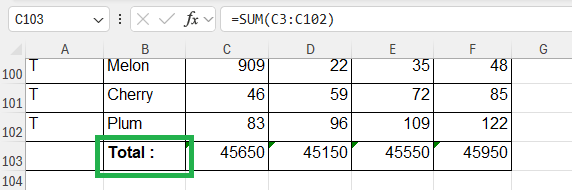
Total :(lands the cursor on the footer row wherever it is). - Get Position : Row Field
totalRow(captures the 0‑based row index). - Apply Edits : runs the scan so
totalRowis populated before it is used.
For a totals row directly beneath the data, the captured 0‑based index equals the Excel 1‑based last‑data row, which is exactly what the formula range needs.
6. Build the formulas String Substitute

Four String Substitute steps (Field fC, fD, fE, fF) turn the templates into concrete strings, e.g. SUM(C${firstDataRow}:C${totalRow}) → SUM(C3:C13). This is done in the record because Set Formula does not expand ${...} placeholders in a cell’s position at apply time.
7. Write the formulas — Set Formula
Re‑locate the totals row and write each formula at the current row so no position placeholder is needed:
- Scan Forward : value
Total :. - Set Formula : Formula Field
fC, Row (blank = current), Column2(C). - Set Formula : Formula Field
fD, Row blank, Column3(D). - Set Formula : Formula Field
fE, Row blank, Column4(E). - Set Formula : Formula Field
fF, Row blank, Column5(F). - Apply Edits : writes the formulas into the workbook bytes.
8. Save the file — File Writer
Add a File Writer step to save the finished workbook, e.g. ./data/out/FruitSales.xlsx.
Configuration Note: allowed output paths can be configured in etc/application.conf under the “writable” parameter section.
9. Execute the ETL
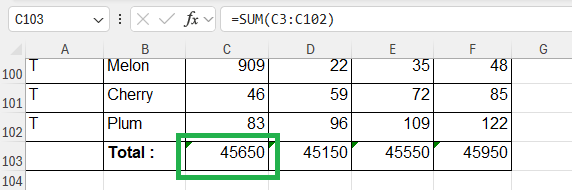
Click Play to run the chain. The rendered workbook now contains live formulas in the totals row, and the range follows the data automatically:
- With an 11‑row datasource (e.g.
/ElixirSamples/DataSource/FruitSales.ds) → totals land on row 14 as=SUM(C3:C13)…=SUM(F3:F13). - With the attached 100‑row datasource → totals land on row 103 as
=SUM(C3:C102)…=SUM(F3:F102), with no change to the chain.
Open the output in Excel and the totals recalculate on load.
Note:
Set Formulawrites the formula but no cached result, so a strict, non‑Excel XLSX reader may show the total cells blank until a recalculation. Excel, LibreOffice and Google Sheets all recalculate on open, so this only affects headless readers.- The two
Apply Editssteps in the attached chainset havedebugenabled sototalRowand anyeditErrorappear in the run log — set them to off for production use.
Why post‑process instead of doing it at render time?
A common question is why the formulas are inserted after rendering rather than emitted by the report itself. The reason is that the RML renderer produces values, not spreadsheet formulas:
- The totals in the template are a report aggregate (
control-source type="Operation" operation="Sum"). The engine adds the numbers as it streams the data and lays the resulting number onto the output, it has no concept of a live Excel cell reference. - RML is format‑agnostic. The same template renders to PDF, HTML, CSV and XLSX. A live
=SUM(C3:C13)only means something in a spreadsheet; baking it into the report would couple the report to one output and break the others. Keeping the report as values is what lets one template serve every format. - Writing
=SUM(C3:C<last>)needs the finished workbook cell model and the final row numbers, which only exist once the sheet is laid out. That is exactly what thexlsx-editsteps operate on. The renderer, streaming rows, doesn’t hold that model. - It stays one job: render and formula insertion run in the same ETL chain, in the same execution. The “post‑process” here means a later step in the same pipeline, not a separate run. It also keeps the choice flexible: whether an output gets live formulas is a property of the pipeline, not the report, so the same RML can serve both plain and formula‑bearing workbooks.