In this example we will be using this sample dataset:
| STS_CD | STS_DSCP |
|---|---|
| SS | Success |
Here, the STS_CD field holds the status code, while STS_DSCP contains the description. The requirement is to rename the description so that when STS_CD equals “SS”, the value of STS_DSCP should display “Successful” instead of “Success”.
Steps to Implement:
-
Open your report template in Repertoire Designer.
-
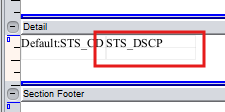
Locate the target field that you want to rename. In this example we will be using the field “STS_DSCP”:
-
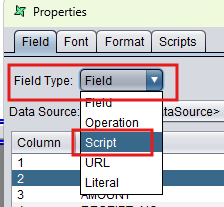
Double click it to open up the properties window. Change the field type to Script.
-
Attach the script below to the field’s script property.
// Retrieve the data source named "Default" into variable x
var x = DataCacheManager.getCache("Default");

// Define the string value we want to use when renaming
var y = "Successful";

// Check if the field STS_CD from the data source equals "SS"
if (x.getString("STS_CD") == "SS") {
//Set y as the new value.
    y;
}
- Save the template and render it; the output should now look like this:
