This guide resolves the issue where the Ambience/Repertoire login page flashes continuously and redirects back to /simple-sso/auth. The problem arises because the client-side script in web/simple-sso/login.html forces a reload whenever the browser’s clock and the server’s time differ by more than 60000 ms, triggering an infinite loop if clocks are out of sync.
Below are the steps to debug, followed by a temporary workaround:
-
Head over to \web\simple-sso of your Ambience/Repertoire server installation and open up login.html in a text editor.
-
Locate the JavaScript code starting from line 218. It checks the time difference between the browser and server. If the difference exceeds 60000ms, the page reloads.
-
To debug, add the following script after the line console.log("Difference is "+diff) line:
console.log("Date now is "+Date.now());
console.log("Elx date is "+elxNow);
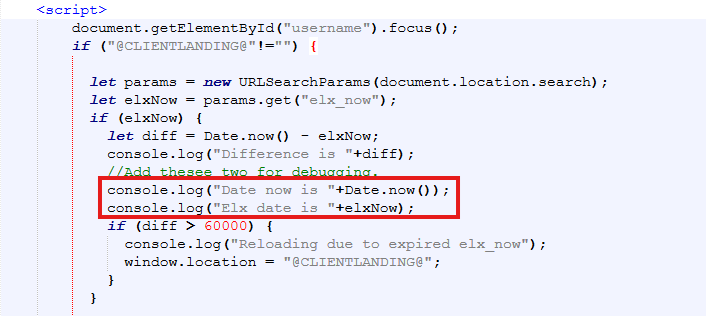
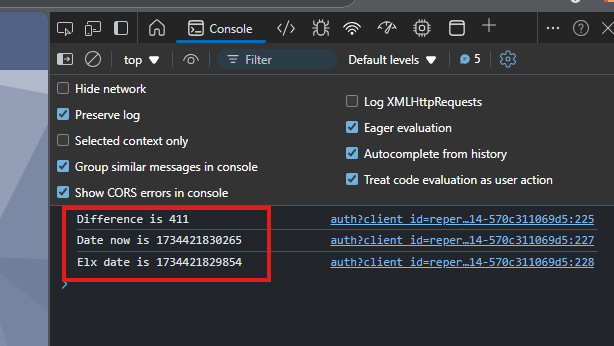
Here, Date.now() reflects the browser timing, while elxNow is the Repertoire server timing. Once you have added the above, please save the file and restart the server.
-
Open the login page in your browser and use the Developer Tools > Console to view the browser and server timings.
-
As a short-term workaround, adjust if (diff < 60000) by increasing the 60000 value to match your timing difference.
NOTE:
For a long-term solution, we strongly recommend ensuring proper time synchronization between the server and client browser. This safeguard prevents users from entering expired sessions, which can cause errors or redirect users to unavailable pages.
While disabling this check entirely would stop the reload, it risks session inconsistencies and stale data. Maintaining the check ensures data integrity and a secure user experience.